Explore Our Blogs
Google Brings Side-by-Side Browsing to AI Mode in Chrome
Google Brings Side-by-Side Browsing to AI Mode in Chrome
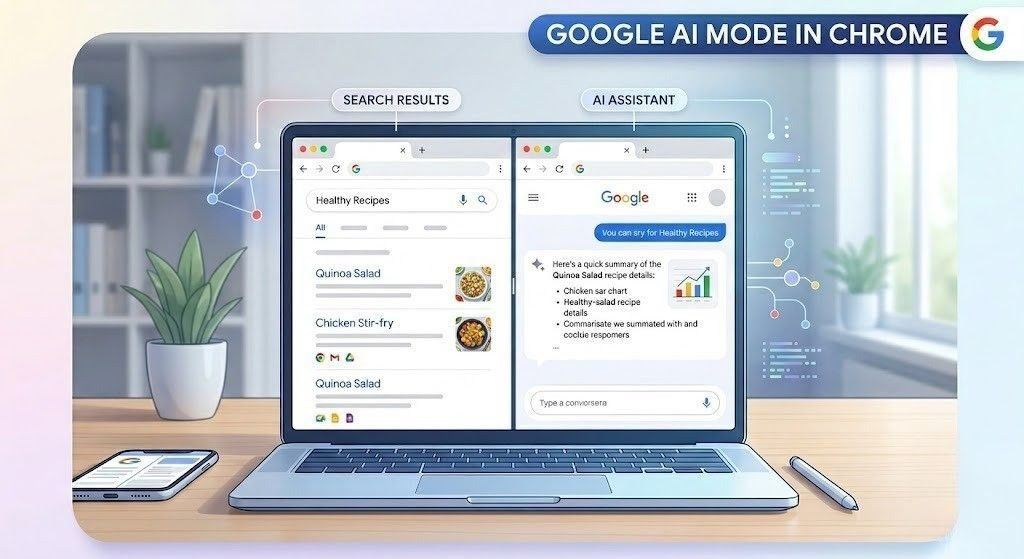
Google is continuing to reshape how people use the internet, and its latest update to Chrome’s AI Mode shows exactly where things are heading. With the addition of side by side browsing, users can now view AI responses and real web pages together without constantly switching tabs.
At first glance, it feels like a small update. In reality, it changes how browsing feels on a very basic level. Everything becomes more connected, more focused, and much easier to follow.
A More Natural Browsing Experience
For years, browsing has followed a simple pattern. You search for something, open a link, read it, then go back and repeat the process. While it works, it often breaks your flow, especially when you are trying to understand something in detail.
With this update, that experience becomes much smoother. When you click on a link inside AI Mode, the page opens next to the AI panel instead of replacing it. Your original search stays visible, and you can continue asking questions while reading.
This makes the entire process feel more natural. Instead of jumping between steps, everything happens in one place.
No More Constant Tab Switching
One of the most common frustrations while browsing is dealing with too many tabs. You open several pages, lose track of useful information, and keep going back and forth trying to reconnect everything.
Side by side browsing solves this problem in a simple way. You can read a webpage while keeping your AI search visible at the same time. You do not lose context, and you do not have to rely on memory.
This becomes especially useful when you are researching something or comparing different options. Everything stays in front of you, which makes it easier to stay focused.
A Practical Example
Imagine you are looking for a coffee maker that fits a small space and has specific features. You describe your needs in AI Mode, and it gives you a list of options.
Now, when you click on one of those options, the product page opens beside the AI panel. While viewing it, you can ask questions like how easy it is to clean or how it compares to similar models.
The AI responds instantly while you are still looking at the product. This makes the process feel more interactive and helps you make decisions with more confidence.
Adding Context to Your Search
Another important addition is the new plus menu. This feature allows you to include your existing work directly into your search.
You can add open tabs, images, or even PDF files as context. Instead of starting from scratch, your search becomes more personalized and relevant to what you are already doing.
For example, if you have multiple articles open on a topic, you can bring them together and ask the AI to summarize or compare them. The response becomes more accurate because it is based on real context.
A Clear Boost in Productivity
This update makes a noticeable difference in how efficiently you can work online. You do not have to manage multiple tabs or switch between different tools anymore.
Students can review study material and get explanations instantly. Professionals can analyze reports while asking questions in real time. Even casual users benefit when planning purchases or learning something new.
For content creators, this creates a more efficient research process. You can explore competitor pages, refine ideas, and discover high volume low competition keywords without leaving your screen.
Content Quality Becomes More Important
When users can view multiple sources at the same time, it becomes much easier to judge the quality of content. If something is unclear or lacks depth, users can quickly move on to a better source.
This naturally raises the standard for online content. Clear, helpful, and well structured information stands out much more. Content that is written with real value in mind becomes easier to trust and engage with.
A More Human Way to Interact With Information
What makes this update interesting is how simple it feels to use. There is no complex setup or learning curve. It simply removes the friction from something people already do every day.
You read something, ask a question, get an answer, and continue exploring without interruption. The experience feels smooth and continuous.
It also changes how people interact with information. Instead of searching in separate steps, the process becomes more fluid and connected.
A Few Things to Keep in Mind
Like any new feature, there are a few small adjustments. Some users may need time to get used to the layout. Devices with lower performance might experience slight slowdowns when running AI and browsing together.
It is also important to remember that AI responses should still be checked when accuracy matters. The advantage here is that verification is much easier because the source is right next to the response.
Final Thoughts
Google bringing side by side browsing to AI Mode in Chrome is a meaningful improvement to everyday browsing. It removes one of the biggest frustrations, which is losing context while exploring different pages.
The result is a smoother and more focused experience that feels easier to use.
For users, it saves time and effort. For creators, it highlights the importance of producing clear and valuable content.
In the end, it is a simple idea that makes a big difference in how people interact with the web.
To stay ahead in this evolving space, consider working with a trusted digital marketing agency like Scaling High Technologies.
Related Articles
Google March 2026 Core Update Rollout Is Now Complete: Understand what changed and how it impacts your website rankings.
CMS vs Custom Website Development: Which Is Better: Explore which option suits your business goals and scalability needs.
Google March 2026 Spam Update: What You Need to Know: Learn how Google is tackling low-quality content and spam practices.
Custom vs Template Websites: What Developers Recommend: Find out which website approach delivers better performance and flexibility.
Other Blogs
Your Complete Digital Solution
SEO, Stunning Websites, & Creative Designs
All in One Place
Ready to take the next step? Join us now and start transforming your vision into reality with with expert SEO, web development, and graphic design services.